MIDI to MP3 Converter Online
Convert MIDI to MP3 online and get high-quality audio quickly
Turn Your MIDI into a Playable MP3 in One Click
You usually need a free MIDI to MP3 converter when your demo cannot be opened on your phone or sent to a client. This online tool turns your MIDI into a playable MP3 in seconds. You can share real audio instead of project data and finish the job in your browser without installing software or creating an account.
Fast, Private and Reliable MIDI to MP3 for Daily Use
Convert MIDI to MP3 Instantly in Your Browser
When you need a playable MP3 for a quick demo or preview, this free MIDI to MP3 converter gets the job done in seconds. It works right in your browser, so you don’t need plugins. You can share your track immediately after conversion.
AI-Enhanced Processing for Better Results
The AI analyzes your MIDI file to optimize timing and dynamics while converting to MP3. You get a more accurate and natural-sounding track than basic converters. Your music keeps its intended feel after conversion.
Safe and Clean Processing
You’ve probably seen online MIDI converters full of ads or misleading buttons. This one keeps your files private and doesn’t require login or uploads. You can focus on your music without worrying about your data.
Consistent Playback Every Time
Sometimes the same MIDI sounds different on another computer. This AI-powered MIDI to MP3 tool renders it into a fixed MP3 that plays exactly the same everywhere. You avoid repeated exports and surprises when sharing your track.
Handles Large MIDI Projects Smoothly
Long arrangements or layered tracks can be tricky to convert. This online audio converter supports files up to 100 MB, so you don’t have to split your project. You can finish your MIDI to MP3 conversion quickly, even for bigger projects.
Free and Easy to Use
You can convert MIDI to MP3 online without paying a dime. The process is simple and requires no registration, so you can get your audio files quickly for personal or professional projects.
High-Quality MP3 Output
You don’t have to compromise on sound quality. This MP3 converter preserves the original MIDI’s details while producing clear, high-quality MP3 audio. You can share or use your tracks without worrying about loss in fidelity.
How to Convert MIDI to MP3 Online
Step 1. Upload Your MIDI. Pick your MIDI file and upload it straight from your browser. No installation or accounts needed — you stay in control of your files.
Step 2. Start the Conversion. Set MP3 as output and click Convert. The tool turns your MIDI into an MP3 in seconds. You get real audio without extra steps or software hassles.
Step 3. Download and Share. Once it’s ready, download your MP3 and share it anywhere. You can play it on your phone, send it to a client, or add it to a project instantly.
Understand Your Files Before Converting to MP3
What Is a MIDI File?
A MIDI (Musical Instrument Digital Interface) file doesn’t contain real audio. It’s a set of instructions that tells instruments which notes to play, when to play them, and how loud. That’s why a MIDI might sound different depending on the device or software you use. Converting it to MP3 turns these instructions into actual audio you can listen to anywhere.
Why MP3 Works Everywhere
MP3 is a standard audio format that stores real sound in a small, portable file. Once you convert a MIDI to MP3, the track becomes fixed audio that plays the same on phones, computers, or streaming platforms. It’s reliable, easy to share, and works across almost any device without extra software.
Move Beyond Simple MIDI to MP3 with Pro Audio Toolkits
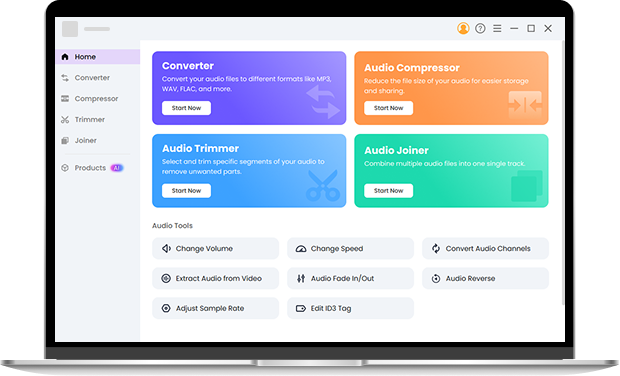
Once you start handling multiple tracks or bigger projects, a basic MIDI converter may feel limited. Pro Audio Toolkits lets you batch convert, set bitrates, and keep high-quality audio. You move from simple MIDI to MP3 tasks to a smooth, professional workflow without extra hassle.
Frequently Asked Questions About MIDI to MP3
-
1. Is this really an online MIDI to MP3 tool?
Yes, it runs in your browser, so you can convert MIDI to MP3 online without downloading or installing anything.
-
2. Why does my file sound different after I convert MIDI to MP3?
A MIDI file stores only note and performance data, and the MIDI to MP3 process renders that data into real audio. After you convert MIDI to MP3, the sound becomes fixed and consistent on every device.
-
3. Is it safe to convert MIDI file to MP3 here?
This MIDI to MP3 converter processes your file locally and does not collect personal information. You can safely convert MIDI file to MP3 for private and client projects.
-
4. Can I batch convert MIDI to MP3?
You can convert multiple MIDI files to MP3 at once. This saves time for demos, game loops, or learning projects. For advanced batch control, Pro Audio Toolkits provides extra options.
-
5. Why do some MIDI files sound different on my computer?
Some MIDI files may sound different depending on the SoundFont used. This tool applies high-quality default sounds to produce consistent MP3 output every time.
-
6. Can I convert MIDI to MP3 on a Mac?
Yes, you can convert MIDI to MP3 directly in your Mac browser. It works smoothly on Safari or Chrome, so you don’t need extra software.
-
7. Is there a direct MIDI to MP3 converter for Windows 10?
Yes, Windows 10 users can convert MIDI to MP3 online instantly. Just upload your file, click convert, and download the MP3 — no installation required.
What This MIDI to MP3 Tool Can Do for You
-
No-Installation Conversion
Run the MIDI to MP3 tool directly in your browser. Start converting without setup or installation.
-
Metadata Is Preserved
Convert MIDI to MP3 without losing file information or tags.
-
Clean and Distraction-Free Interface
Finish your conversion without popups, ads, or misleading buttons.
-
Works on Any Device
Use the tool on Windows, Mac, or shared computers with the same experience.
Give Us 5 Stars!
Show your love by giving 5 stars!
We'll continue to offer best MIDI to MP3 converter.
reviews