MP3 Converter for iPhone
Convert your audio files to MP3 directly in your iPhone browser.
Turn Messy Audio Files into iPhone Ready MP3 Files
Some audio files on your iPhone cannot be played or shared properly because of incompatible formats. This free MP3 converter for iPhone helps you convert common audio formats to MP3 directly in your browser, so your files are ready to use on your iPhone in just a few clicks.
Why You Need an MP3 Converter for iPhone
Many audio files are still saved as FLAC, WAV, AAC, M4A, OGG, or WMA, and iOS apps do not always handle these formats well. A reliable MP3 converter for iPhone helps you convert them into MP3, making your audio easier to play, save, and share across your iPhone apps.
How to Convert Audio to MP3 on iPhone
Step 1. Open the converter and select your files. Open the free MP3 converter for iPhone in Safari or any mobile browser, then choose one or multiple audio or video files from your iPhone storage or the Files app.
Step 2. Choose MP3 as the output format. Select MP3 as the target format so your audio can be played and shared more easily across iPhone apps.
Step 3. Convert and download your MP3 files. Start the conversion and download the finished MP3 files directly to your iPhone after processing completes in your browser.
Free MP3 Converter Designed for iPhone Browsers
Convert All Common Audio Formats for iPhone Playback
You can convert MP3, M4A, AAC, AIFF, ALAC, FLAC, AC3, WAV, OGG, AMR, and WMA files into MP3 in one place. This makes it easier to prepare audio files that play smoothly in iOS music and media apps without worrying about format compatibility.
Local Conversion Inside Your Browser
All audio processing runs directly in your browser instead of being uploaded to a remote server. This is useful when converting personal recordings, voice memos, or private audio files on your iPhone and keeping everything on your own device.
Batch Audio Conversion for Daily File Management
When you need to convert several audio files at the same time, you can upload multiple files and convert them together. This is practical for organizing study recordings, interviews, or music tracks without repeating the same steps.
Supports Audio Files up to 100 MB Online
The online MP3 converter for iPhone supports audio files up to 100 MB, which covers most everyday use cases such as music tracks, voice recordings, podcasts, and short extracted audio from videos on iPhone.
A Simple Workflow That Fits Small Screens
The conversion process stays short and clear. Upload your files, select MP3, and save the results. The interface works comfortably on smaller iPhone screens without complex menus.
Popular iPhone Use Cases
Convert iPhone Voice Memo to MP3 for Sharing
Voice Memos recorded on iPhone are usually saved in M4A format. If you need to send a recording to someone who cannot open it easily, this MP3 converter for iPhone lets you convert iPhone voice memo to MP3 directly in your browser for easier sharing and archiving.
Convert MP3 to iPhone Ringtone Files
If you already have an MP3 file and want to use it as your iPhone ringtone, you can convert the MP3 into the iPhone ringtone format (M4R) first. This makes the audio compatible with iOS ringtone tools and helps you prepare custom ringtones from your own music or recordings.
When You Need More Control with Pro Audio Toolkits
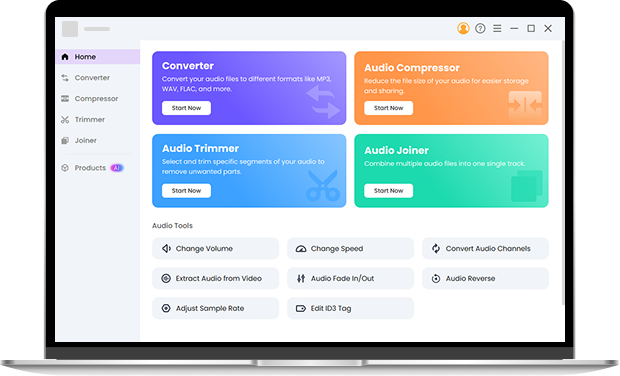
If you often work with large audio collections or need advanced control over output quality, Pro Audio Toolkits can help you go further. You can batch convert large numbers of files, keep original encoding and bitrates, customize output settings, trim and join audio clips, and handle more formats offline on Windows or Mac. It is a good choice when your iPhone browser workflow is no longer enough for more demanding audio tasks. Try it right now.
FAQ About MP3 Converter for iPhone
-
1. Can I use this MP3 converter for iPhone directly in Safari?
Yes. You can open the MP3 converter for iPhone in Safari or any other mobile browser and convert your audio files without installing any app.
-
2. How do I extract audio from video on iPhone and save it as MP3?
Upload your video file in the converter, choose MP3 as the output format, and start the conversion. This allows you to extract audio from video on iPhone and save only the sound as an MP3 file on your device.
-
3. How do I convert iPhone voice memo to MP3?
Export your Voice Memo file to the Files app, open it in this mp3 converter for iPhone, choose MP3 as the output format, and download the converted file for easy sharing.
-
4. Does this tool support batch conversion on iPhone?
Yes. You can select multiple audio files and convert them together in one session, which is useful when organizing recordings or music on your iPhone.
-
5. Can I convert MP3 to iPhone ringtone using this tool?
You can upload your MP3 file and convert it to the iPhone ringtone format (M4R). After conversion, the file can be used with iOS ringtone tools to set a custom ringtone on your iPhone.
-
6. What audio formats can I convert to MP3 on iPhone?
You can convert M4A, AAC, AIFF, ALAC, FLAC, AC3, WAV, OGG, AMR, WMA, and MP3 files into MP3 for easier playback and sharing on iPhone.
-
7. Is there a file size limit when using this MP3 converter for iPhone?
Yes. The online converter supports files up to 100 MB, which is suitable for most daily audio and short video to audio conversion needs on iPhone. For larger files, you can use Pro Audio Toolkits.
-
8. What is the best mp3 converter for iPhone?
For most everyday iPhone users, the best mp3 converter for iPhone is one that runs directly in the browser, supports common audio formats such as M4A, AAC, WAV, and FLAC, and does not require uploading files to a server. This converter focuses on local browser processing, supports batch conversion, and works well for audio files under 100 MB, which fits common iPhone use cases like voice memos and shared audio files.
Extra Handy Tools for Quick MP3 Conversion on iPhone
-
Multiple File Selection
Pick several audio files at once and convert them together instead of processing them one by one.
-
Local Processing Mode
All conversions run inside your browser, keeping your audio files on your own device.
-
Common Format Coverage
Work with MP3, M4A, AAC, AIFF, ALAC, FLAC, AC3, WAV, AMR, etc., without installing any software.
-
Optimized for Everyday iPhone Files
Designed for online conversion of audio files under 100 MB, covering most daily iPhone use scenarios.
Give Us 5 Stars!
Show your love by giving 5 stars!
We'll continue to offer best MP3 converter for iPhone.
reviews