MP3 to M4R Converter Online
Convert MP3 to M4R online with fast, private and high-quality output.
Convert MP3 to M4R Online in Seconds
Convert MP3 to M4R directly in your browser and get a clean, ready-to-use M4R file in seconds. This online MP3 to M4R tool is built for fast and stable conversion without apps, accounts, or complicated settings, and is also commonly used for creating iPhone ringtones from MP3 files. It uses an AI-assisted engine to automatically analyze your audio structure and format details, improving MP3 to M4R conversion accuracy and output stability.
How to Convert MP3 to M4R Online
Step 1. Upload your MP3 file from your device.
Step 2. Set M4R as output format and let the MP3 to M4R process run in your browser.
Step 3. Download your converted M4R file instantly.
Each step is completed online with no installation, no account, and no file upload to external servers.
Why This MP3 to M4R Converter Works Better
One-Click MP3 to M4R Conversion
Upload your audio and convert MP3 to M4R with a single click, then you will receive a standard M4R file that works across Apple devices and compatible players without any extra settings.
Standard M4R Output for Apple Devices
This tool generates proper M4R containers and follows Apple audio packaging rules during MP3 to M4R conversion, so your files work smoothly on iOS and macOS without format errors. AI-assisted format analysis further reduces container and compatibility issues for more reliable results.
Local Browser Processing
Your MP3 to M4R conversion runs directly inside your browser, which means your audio never leaves your device and no personal data is collected during the process.
Lightweight Batch MP3 to M4R Conversion
Convert multiple MP3 files to M4R in one session without installing any software. It is designed for quick, small batches in your browser, so you can finish simple MP3 to M4R tasks faster without complex settings.
Keeps Original Metadata
When you convert MP3 to M4R, your original metadata such as title and artist stays with the file, helping you keep your audio library organized after conversion.
Free and Anonymous Online Tool
You can use this free M4R converter without login, subscription, ads or popups, so you can focus entirely on converting your files without interruptions.
What Is MP3 and What Is M4R
MP3 is a widely used compressed audio format for music and voice across almost all platforms, while M4R is an Apple audio container based on AAC technology and commonly used in Apple workflows, including iPhone ringtone distribution. When you convert MP3 to M4R, you change the audio packaging so your audio becomes compatible with Apple-focused apps and systems without changing how you actually use the sound itself.
Need More Control for MP3 to M4R? Try Pro Audio Toolkits
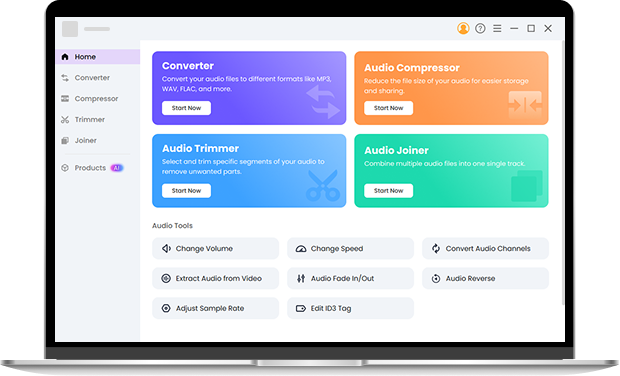
When you need to convert multiple files or fine-tune quality before MP3 to M4R conversion, Pro Audio Toolkits gives you full control in one place. You can batch convert MP3 files, customize bitrate and codec settings, and make quick edits such as trimming, fade in or fade out, speed and volume adjustments before exporting to M4R. All processing runs locally, so your audio quality and metadata stay intact, while AI-assisted processing helps select better encoding parameters for consistent results. Install it now.
FAQ About MP3 to M4R Conversion
-
1. How do I convert MP3 to M4R online?
You can upload your file to this MP3 to M4R online tool, start the conversion, and download the converted M4R file immediately.
-
2. Is this MP3 to M4R converter free and safe?
Yes. This MP3 to M4R converter works locally in your browser and does not collect personal information.
-
3. Can I convert MP3 to iPhone ringtone with this tool?
Yes. You can convert MP3 to M4R directly with this online tool and use the output file as an iPhone ringtone. The converted M4R file follows Apple audio packaging rules, so it can be imported into iOS or iTunes-based workflows without compatibility issues.
-
4. Will converting MP3 to M4R change my audio quality?
This MP3 to M4R tool is optimized to keep your original audio quality and metadata.
-
5. Is M4R only used for iPhone ringtones?
No. While MP3 to M4R conversion is widely used for creating iPhone ringtones, M4R files can also be used in other Apple audio workflows and compatible apps.
Advanced MP3 to M4R Tool Features
-
Wide Format Compatibility
Besides MP3 to M4R, you can convert between more than 50 audio and video formats.
-
AI-Assisted Conversion Engine
The system improves stability and reduces conversion errors during MP3 to M4R processing.
-
Cross-Platform Access
Convert MP3 to M4R on Windows, Mac and mobile browsers.
-
Clean and Secure Environment
No ads, no popups, no malware and no hidden redirects.
Give Us 5 Stars!
Show your love by giving 5 stars!
We'll continue to offer best MP3 to M4R converter.
reviews