Free Video to Audio Converter Online
Turn any video into an audio file easily & quickly
Why You Need a Video to Audio Converter Today
When you work with videos, you often care more about the sound than the visuals. You might want to save a podcast from a recorded interview, pull music from a concert clip, or extract clear dialogue from a screen recording. A video to audio converter helps you convert video to audio formats like MP3 so you can listen, edit, or reuse the sound without dealing with large video files. Many creators use a video to MP3 converter to simplify their workflow, especially when storage space, sharing speed, or compatibility matters.
What This OKmusi Video to Audio Converter Does
OKmusi video to audio converter is an online tool that extracts audio tracks from video files and saves them as standalone audio formats such as MP3. You use it when you need to convert video to audio file for listening, editing, archiving, or sharing across different devices and platforms.
Video to Audio Converter Features That Matter in Real Use
Extract Audio Without Losing Original Metadata
When you convert MP4 to MP3, tags like title, artist, or source often disappear. This video to sound converter keeps existing metadata intact, which helps you organize files later. You can import the audio into players or editors without re tagging everything from scratch.
Convert Many Video Formats into MP3 Smoothly
You may work with clips from phones, cameras, or downloaded videos. This video to MP3 converter handles common video formats and turns them into audio files that play everywhere. You do not need separate tools for different sources, which keeps your process simple.
Stay Anonymous While You Convert Video to Audio
Some online tools ask for accounts or emails before they work. This free video to audio converter online lets you convert video to MP3 file without login. You upload, extract audio from video, and leave without sharing personal information.
Clean Interface That Does Not Interrupt Your Task
Popups and misleading buttons break focus. This video audio extractor keeps the interface clear so you can turn video into MP3 without distractions. You stay focused on the result instead of avoiding ads or redirects.
How to Turn a Video into an Audio File
Step 1. Open the video to audio converter in your browser on any device. Then upload your video file, such as MP4 or another supported format.
Step 2. Choose MP3 or another audio format if available. Next, start the conversion and wait while the tool extracts audio from video.
Step 3. Download the audio file and use it for listening or editing.
This process works well when you need to convert video to MP3 quickly for daily tasks.
Convert Large Video File to Audio Easily
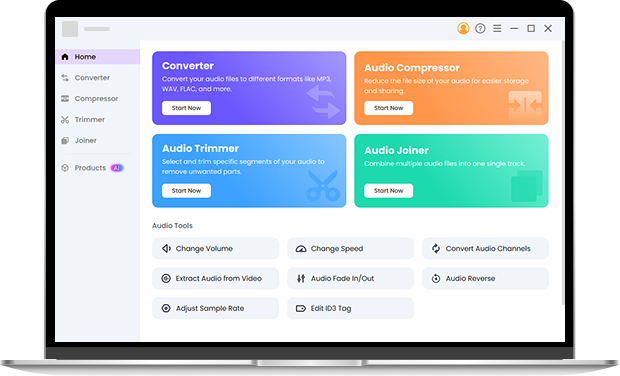
Online tools work well for quick extraction, but larger projects need more control. Pro Audio Toolkits help you handle batch conversion, advanced audio editing, trimming, compression, and joining files offline. If you often convert video to audio for content creation, podcasts, or music projects, these toolkits give you consistent results and deeper control over output quality. Try it right now.
FAQ About Video to Audio Converter
-
1. How do I convert MP4 to MP3 online?
To convert MP4 to MP3 online, upload your video file to a video to audio converter and choose MP3 as the output format. The tool extracts the audio track and saves it as a standalone audio file, which you can download and play on any device.
-
2. Can I convert video to MP3 on my phone?
Yes, you can convert video to MP3 on your phone using an online video to audio converter. Since it runs in a browser, you do not need to install an app. This works well on both iPhone and Android when you want to turn a video into an audio file quickly.
-
3. How do I convert a screen recording to MP3?
If you have a screen recording with useful sound, you can upload the recording file to a video to audio converter and extract the audio as MP3. This is common for meetings, online classes, or tutorials where you only need the voice or system audio.
-
4. Will converting video to audio affect sound quality?
Converting video to audio does not automatically reduce sound quality. The result depends on how the audio is extracted and encoded. When you convert video to MP3, the original audio track is preserved and saved in a widely supported format for everyday listening.
-
5. How do I extract audio from a video file?
To extract audio from a video file, you use a video audio extractor that separates the sound from the visual content. After the process finishes, you get an audio file such as MP3 that you can edit, store, or share without keeping the original video.
-
6. How do I turn a video into a ringtone?
To turn a video into a ringtone, you first extract the audio from the video file using a video to audio converter. After that, you trim the audio to a short clip that fits ringtone length requirements. Many people prefer using a desktop audio converter and trimmer when they need precise cuts and consistent sound results.
-
7. How do I extract audio from video on Android?
On Android, you can extract audio from a video by opening an online video to audio converter in your mobile browser. Upload the video file, choose MP3 as the output, and download the audio once the extraction finishes. This works well when you want quick access to sound without installing extra apps.
-
8. How do I turn a video into an audio file on iPhone?
To turn a video into an audio file on iPhone, you can use a browser-based video audio converter. Upload the video, convert it to MP3, and save the audio file for listening or sharing. If you need to trim the audio or prepare it for reuse, a desktop audio converter and trimmer offers more control.
Extra Details about the Video to Audio Converter
-
Cross Platform Access
You can convert video to audio on Windows, Mac, or mobile browsers.
-
Lightweight File Handling
The tool handles uploads without slowing down your device.
-
200+ File Format Supported
Convert video into audio formats like MP3, WAV, AAC, and FLAC.
-
Simple Learning Curve
You understand how to extract audio from video on your first try.
Give Us 5 Stars!
Show your love by giving 5 stars!
We'll continue to offer best Video to Audio Converter.
reviews